BombBomb alternative for sales teams

A BombBomb alternative workflow for list-based sales outreach

Evaluate Pitchlane when your campaign starts with a prospect list and one reusable pitch. Record once, personalize for every lead, review a test video, and push the results into the sales tools that already run your outreach.

Short answer

Pitchlane belongs on the shortlist when one pitch must serve a prospect segment

Pitchlane is built around a specific outbound job: record a pitch once, personalize it for every lead, and pass the finished work into an existing sales stack. It is not being presented as a replacement for every recording, hosting, collaboration, or administration job.

BombBomb's public pages describe recording and video-messaging workflows across Gmail, Outlook, browser extensions, and mobile apps; analytics and team controls depend on package. If those are central to your current process, include the exact package and workflow in a controlled trial before deciding to switch.

Documented workflow

What does a Pitchlane campaign actually require?

After one reusable recording, campaign setup proceeds through Import Leads, Customize Landing Page, and Review Test Video. The practical constraint is message fit: every prospect in the segment must be able to receive the same spoken pitch.

  1. 1. Define one coherent segment. Group prospects with the same problem, offer, and reason to respond.
  2. 2. Record one reusable pitch. Do not say an individual recipient's name or company in the spoken recording.
  3. 3. Import and validate leads. Resolve rejected rows before generation rather than discovering missing data after launch.
  4. 4. Customize the landing page and review a test video. Treat the test as a campaign gate, not a formality.
  5. 5. Hand off to the sending stack. Push into Instantly, Smartlead, lemlist, HubSpot, Apollo, or a related workflow; keep sends, replies, and opportunities in the system that already owns them.
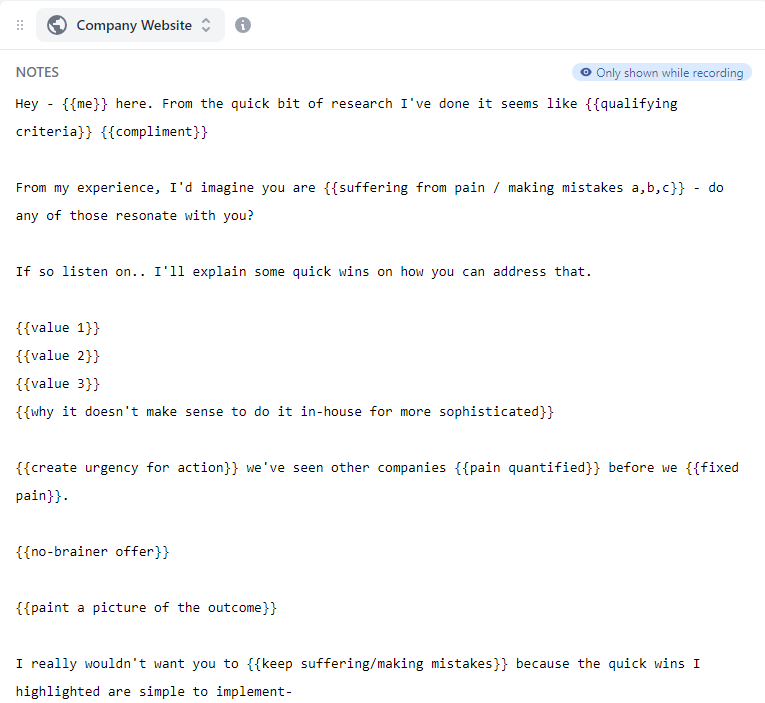
Pitchlane script editor showing guidance for a reusable campaign recording
The reusable-pitch constraint: write for the segment, not one named account. If the spoken message only works for a single prospect, split the list or record another pitch. Open the full-size screenshot ↗
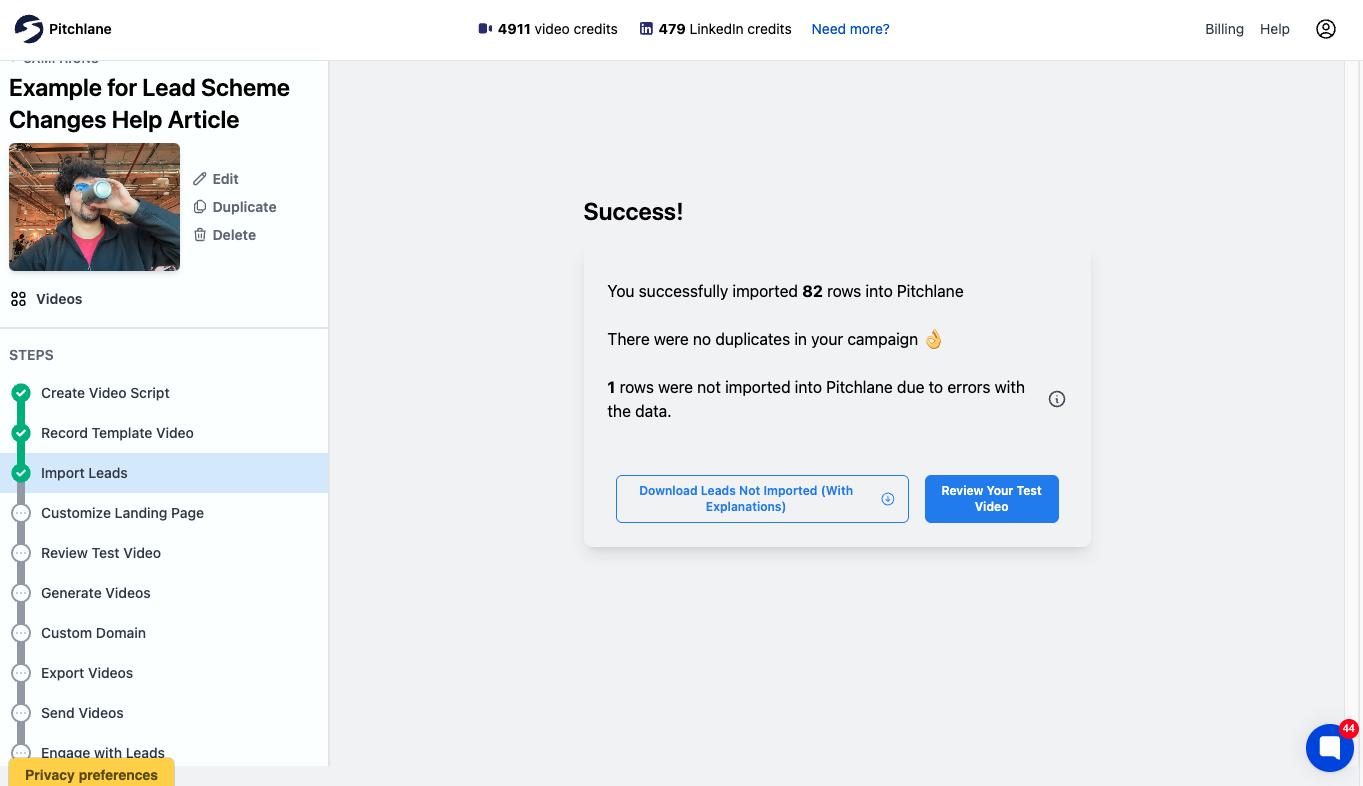
Pitchlane lead import result showing 82 rows accepted and one row rejected because of a data error
Observed import edge case, not a benchmark: this pictured 83-row example accepted 82 rows and rejected one for a data error. Rejected-row details were available to download, so the bad row could be corrected before the campaign continued. Open the full-size screenshot ↗

Why this workflow can fail

The common failure is not the video file; it is an incoherent list. If one recording tries to address unrelated industries, roles, or pains, personalization around the video cannot repair the spoken message. Split the segment before importing leads, then review one test output before generating the rest.

Good fit

Pitchlane may fit when…

  • Your team already has a CRM or sequencer and wants to add personalized video rather than replace the sales stack.
  • A coherent prospect segment can receive the same spoken pitch.
  • You want to import leads, review a test video, and hand finished assets into an existing outreach workflow.
  • Instantly, Smartlead, lemlist, HubSpot, Apollo, or a related workflow already sits in your stack.

Non-fit

Do not treat Pitchlane as a drop-in switch when…

  • Your team needs every salesperson to record unrelated one-off messages rather than run segmented campaigns.
  • Your current vendor stores videos, links, templates, reporting history, or permissions that must migrate automatically.
  • You have not identified which system owns contacts, consent, suppression, sends, replies, and opportunities.
  • You cannot test the receiving integration and fields with non-sensitive sample data before launch.

Switching checklist

What should you verify before changing the current workflow?

A safe evaluation preserves the existing process until sample data, output quality, sending handoff, and ownership boundaries have been checked. Do not assume direct import of another vendor's assets or history.

  1. 01

    Write down the current jobs: recording, hosting, links, landing pages, analytics, integrations, libraries, permissions, and administration.

  2. 02

    Mark each job as essential, useful, or unused. Test the essential jobs rather than comparing every available feature.

  3. 03

    Inventory videos, links, templates, analytics history, permissions, and team access that must remain available.

  4. 04

    Define one coherent sample segment and remove sensitive data that is not required for the test.

  5. 05

    Import the sample, resolve rejected rows, customize the landing page, and review a test video.

  6. 06

    Verify the receiving integration and fields. A directory listing alone does not establish the data flow you need.

  7. 07

    Compare live pricing using the real number of users, campaign volume, integrations, reporting, and team controls.

  8. 08

    Keep the current workflow available until links, sends, replies, reporting requirements, and CRM handoffs have passed the test.

Pricing

Price the workflow you tested

Check the live BombBomb pricing page and current Pitchlane pricing. This page does not claim that either product is universally cheaper.

Build the estimate from the number of users, campaign volume, sending workflow, integrations, reporting, and team controls demonstrated during the trial. A lower entry price is not a saving if the required workflow sits in a different package or still needs another tool.

Questions

Frequently asked questions

Who should evaluate Pitchlane as a BombBomb alternative?

Evaluate Pitchlane when your campaign starts with a prospect list, one reusable pitch, and an existing CRM or sequencer. Pitchlane's documented flow moves from recording through Import Leads, Customize Landing Page, and Review Test Video before the videos enter a connected outreach workflow.

Is Pitchlane a complete replacement for BombBomb?

No. Pitchlane is a focused option for record-once personalized sales outreach. BombBomb's public pages describe recording and video-messaging workflows across Gmail, Outlook, browser extensions, and mobile apps; analytics and team controls depend on package. Test the exact jobs your team uses before switching.

Is there a free or low-cost BombBomb alternative?

This page does not establish either product as an ongoing free option or claim that Pitchlane is cheaper. Check the live Pitchlane and BombBomb pricing pages, then price the actual number of users, campaign volume, integrations, reporting, and team controls you need.

What is the difference between video email and scalable personalized outreach?

Video email describes the delivery format. Scalable personalized outreach also needs a repeatable campaign process for importing leads, creating prospect-specific assets, reviewing an output, and handing the result to the CRM or sequencer that sends and tracks the campaign.

Can Pitchlane work with my CRM or sending tool?

Pitchlane pushes into Instantly, Smartlead, lemlist, HubSpot, Apollo, and related workflows. Verify the exact integration and fields with sample data before changing a live campaign. The CRM or sequencer should continue to own contacts, sends, replies, and opportunities.

Can I import my BombBomb videos and history into Pitchlane?

Do not assume a direct migration. Inventory existing videos, links, templates, analytics history, permissions, and team access, then decide what must remain available. Test Pitchlane with sample data and keep the current workflow intact until the new handoff has been validated.

Test the campaign, not a feature list

Record one pitch and validate the full handoff

Start with one coherent segment, review a test video, and keep your existing CRM or sequencer in control of the outreach process.

BombBomb is a trademark of its respective owner. Pitchlane is not affiliated with or endorsed by BombBomb. BombBomb product and package details should be verified on its official product and pricing pages.